Beams
In the graphical screen beams can be added very easy by drawing them. In the function bar you choose this image 
Beams are drawn as a 'polyline' just as you know it in AutoCAD.The begin node from a following beam is the end node of the last drawn beam.
It is possible, but not necessary, to draw nodes before you insert the beams.You can also start with drawing the beams, in this way the nodes will be inserted automatically.
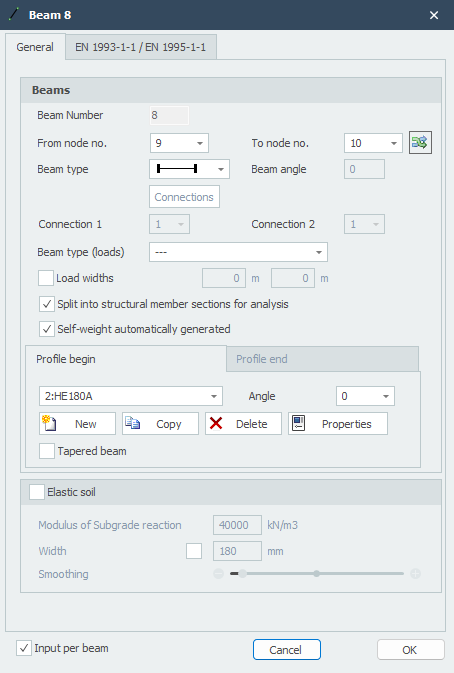
When you draw your first beam, the dialog box shown below appears. In this box you can insert the beam connections and the profile of the beam. Use the escape-key to end the drawing of the beams.
As you are drawing a beam, help lines (horizontal and vertical) will appear connected to the previous inserted nodes. Often the node, to which you want to draw the beam, has the same x- or z-value as the previous one. In this way it is easy to insert nodes. Obviously you can adapt the coordinates afterwards numerically or by moving the node.
While drawing a new beam you will see a dimension line parallel to the beam. You can, just as you know it in AutoCad, immediately insert the distances numerically by entering the value / values your keyboard. There are 3 possibilities for drawing a beam:
1.Drawing a beam with a known length. The value will appear in the dimension line. By the use of the enter-key the input is closed and the beam with that length is added.
2.Drawing a beam using relative Cartesian coordinates (dx, dz). Enter the distance in x-direction first. The value will appear in the dimension line. Next you type a point-comma ";" and the distance in the z-direction. The value appears in a second input field. By the use of the enter-key the input is ended and the beam is added.
3.Drawing a beam using relative polar coordinates (R, angle) First you enter the radius. The value appears in the dimension line. Next you type a smaller-than-key : "<'' and the angle in the xz-direction. The value appears in a second input field. By the use of the enter-key the input is ended and the beam is added.
- Input of relative cartesian coordinates (dx, dz) or absolute cartesian coordinates (x, z).
Press the space key and the dialog box below appears. Here you can enter relative coordinates or absolute coordinates directly.
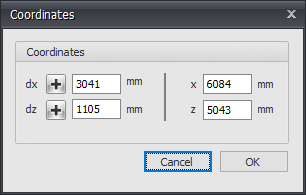
In this way, you can quickly insert your construction.
 Look at the demo.
Obviously it is possible to change the beams and nodes you inserted afterwards.
Changing a beam
Changing a beam is possible by clicking on the beam with the left mouse button, and subsequently choose for properties by clicking with the right mouse button. There is a more easy way, namely a double click on the beam. Consequently the following dialog box will be opened.
Beam number
This is the number of the beam.
From node no.
This is the number of the begin node.
To node no.
This is the number of the end node.
Beam angle
This is the angle in degrees with the global x-axis. The direction opposite to the clockwise direction is positive.
Beam type
By the use of the beam type it is shown if the beam in the regarding node is connected by a hinged or a stiff connection.
Indication
Description

Fixed connection both sides (default)

Fixed connection at beginning; pinned connection at the end

Pinned connection at beginning; fixed connection at the end

Both sides pinned connection

Fixed connection both sides, ONLY tension

Fixed connection at beginning; pinned connection at the end, ONLY tension

Pinned connection at beginning; fixed connection at the end, ONLY tension

Both sides pinned connection, ONLY tension

Fixed connection both sides, ONLY pressure

Fixed connection at beginning; pinned connection at the end, ONLY pressure

Pinned connection at beginning; fixed connection at the end, ONLY pressure

Both sides pinned connection, ONLY pressure

Both sides are connected by springs

At the beginning connected by a spring; pinned connection at the end.

Pinned connection at beginning; end connected by a spring

Both sides a pinned connection

Specifically and only for the spring beam connections, the spring data needs to be inserted.
Beam type (loads)
This type is only used at the load generator. Based on this, the snow and wind loads are generated. You have the choice between ''floor, left vertical wall, right vertical wall, roof, overhang, wall/ parapet ''. See Load generator.
Load width
You can "override" the B- Load width truss per beam by specifying a different load width at the beginning and end of the beam. See Load generator.
Split into structural member sections for analysis
Setting whether, for the determination of the force distribution (framework calculation), the beam has to be split in in partial beams when nodes are found on the beam. This function is enabled by default.
Profile name begin/end
Here you choose the profile name
Angle
The angle of the profile. That is the angle relative to the local coordinate system. Normally this is zero degrees. When you want to for example enter the column rotated (so loaded at it's weak axis) you fill in 90 degrees.



You can also add new profiles, copy profiles and delete profiles. Choose for Properties when you want to adapt the profile data and/or want to select another standard profile type from the profile database.
Tapered beam
You can optionally enter a tapered beam (Non-prismatic beam). The tab "Profile end" is activated. Here you can enter the 2nd profile at the end of the beam. Attention! The basic shape of the profile section (H-, U-, L-shape, etc.) must match that of the profile at the beginning of the beam.
For calculation background. See Tapered beam.
Elastic soil
This enables you to enter a elastic supported beam. The elastic soil is schematized as a number of spring that can support positive reactions only. The spring distance can adjusted with "Smoothing". The spring value of the spring will be calculated automatically.
Modulus of Sub-Grade Reaction
The modulus of Sub-Grade Reaction in kN/m3.
Global values of Sub-Grade Reaction of several types of soil.
TypeModulus Sub-Grade [kN/m3]
well-graded gravel and gravel / sand mixtures, with little or no fine
80000 - 130000
poorly graded gravel, with little or no fine
80000 - 130000
gravel / sand / clay mixtures
50000 - 130000
well-graded sand and gravely sand, with little or no fine
50000 - 100000
poorly graded sand, with little or no fine
40000 - 100000
sand / clay mixtures
30000 - 80000
very fine sand, loamy sand
30000 - 50000
solid clay
10000 - 30000
weak clay and peat
0 - 10000
Width
The width of support. Default is this the width of the used section but it can be adjusted as well. The width is relevant to determine the spring value.
Smoothing
Default the ctc- distance corresponds with 1x section height. It is possible to change this from 0,5x to 5x section height. This value is relevant to determine the spring value.
Input per beam
When this is switched on the dialog above will be displayed each time a new beam is drawn. This for example enables you to switch the profile.
Table Beams
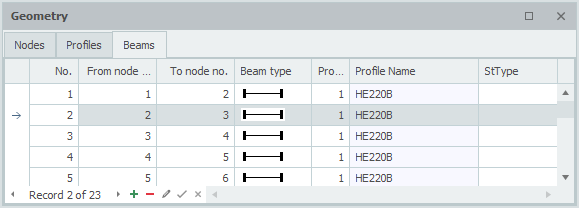
Beams can also be added/changed in the table Beams in the left bottom. It doesn't matter. It is also possible to change in between graphical drawing and numerical input via tables.
Xframe2d
XFrame2d