Staven
In het grafische scherm kunnen staven eenvoudig worden toegevoegd door de staven te tekenen. Kies in de functiebalk voor  In deze modus kunt u 2 knopen selecteren waartussen de staaf zich bevindt.
-
Kies de beginknoop met linker muisknop. Selecteer een bestaande knoop of plaats een nieuwe knoop.
-
Kies de eindknoop met linker muisknop. Selecteer een bestaande knoop of plaats een nieuwe knoop.
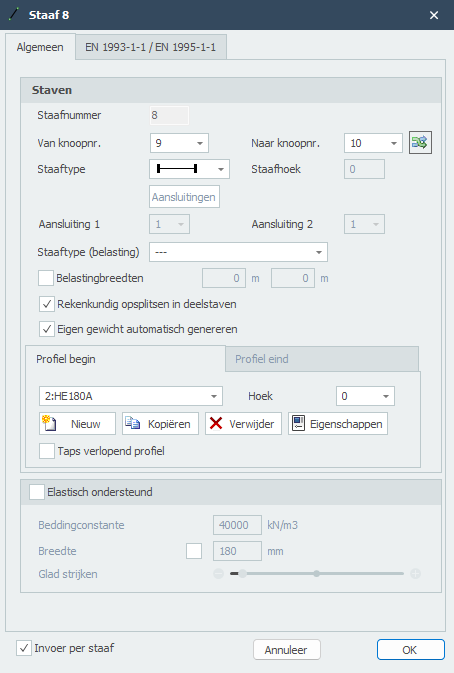
Na selectie van de 2de knoop, de eindknoop verschijnt het onderstaande dialoogvenster.
Staven worden als een 'polylijn' getekend, precies zoals dat ook in AutoCAD gebeurt. De beginknoop van een volgende staaf is de eindknoop van de laatst getekende staaf.
Het kan wel, maar u hoeft niet eerst knopen te tekenen. U kunt ook direct met het tekenen van de staven beginnen; bij het tekenen van de staven worden de knopen automatisch aangemaakt en toegevoegd.
Bij de eerste staaf verschijnt het onderstaande dialoogvenster, waarin u onder andere de staafaansluitingen en het profiel van de staaf kunt instellen. Gebruik de esc-toets om het tekenen van staven te beëindigen.
Terwijl u tekent verschijnen ook hulplijnen (horizontaal en verticaal) naar eerder ingevoerde knopen. Vaak is het zo dat de knoop waarnaar u de staaf wilt tekenen dezelfde x- of z-maat heeft als de vorige. U kunt op die manier snel knopen plaatsen. Vanzelfsprekend kunt u de coördinaten achteraf altijd aanpassen, getalsmatig of door de knoop te verplaatsen.
Terwijl u een nieuwe staaf tekent verschijnt parallel aan de staaflijn een maatlijn. U kunt, vrijwel net als in AutoCAD, de afstanden direct ook getalsmatig invoeren door het getal / de getallen in te typen op uw toetsenbord. Er zijn 3 mogelijkheden om een staaf te tekenen:
1.Tekenen van een staaf met een bekende lengte. Het getal verschijnt in de maatlijn. Met de enter-toets wordt de invoer afgesloten en de staaf met die lengte toegevoegd.
2.Tekenen van een staaf met relatieve cartesische coördinaten (dx, dz). Eerst voert u de afstand in x-richting in. Het getal verschijnt in de maatlijn. Vervolgens typt u een punt-komma ";" in en de afstand in z-richting. Het getal verschijnt in een 2de invoerveld. Met de enter-toets wordt de invoer afgesloten en de staaf toegevoegd.
3.Tekenen van een staaf met relatieve polaire coördinaten (R, hoek) Eerst voert u de straal R in. Het getal verschijnt in de maatlijn. Vervolgens typt u een kleiner-dan-teken "<" in en de hoek in xz-richting. Het getal verschijnt in een 2de invoerveld. Met de enter-toets wordt de invoer afgesloten en de staaf toegevoegd.
- Invoer van relatieve cartesische coördinaten (dx, dz) of absolute cartesische coördinaten (x, z).
Druk op de spatiebalk en het onderstaande dialoogvenster verschijnt. Hierin kunt u relatieve coördinaten of absolute coördinaten direct invoeren.
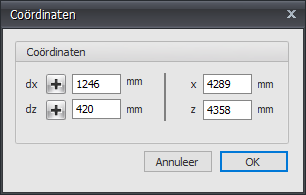
Op die manier kunt u razendsnel uw constructie invoeren.
 bekijk de demo.
Vanzelfsprekend kunt u de staven en knopen die u hebt toegevoegd achteraf wijzigen.
Wijzigen van een staaf
Wijziging van een staaf kunt u door met de linker muisknop op de staaf te klikken en vervolgens met de rechter muisknop te kiezen voor eigenschappen. Of nog makkelijker door te dubbel klikken op de staaf. Het onderstaande dialoogvenster wordt geopend
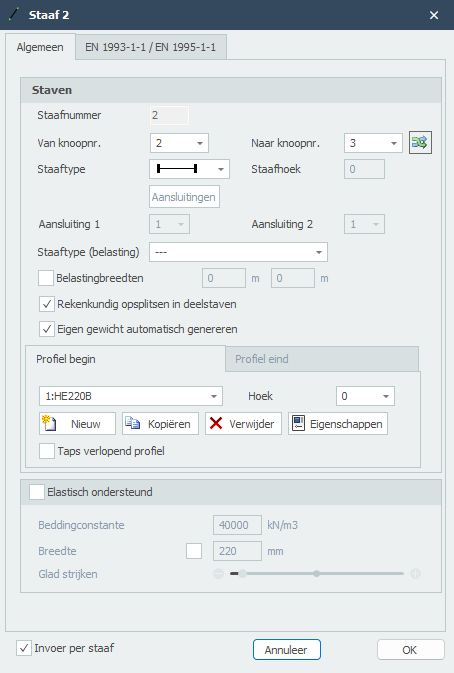
Staafnummer
Het staafnummer wordt automatisch gegenereerd.
Van knoopnr.
Het nummer van de beginknoop
Tot knoopnr.
Het nummer van de eindknoop
Staafhoek
Dit is de hoek in graden met de globale x-as. Tegengesteld aan de klokrichting is positief.
Staaftype
Door middel van het staaftype wordt opgegeven of de staaf in de betreffende knoop scharnierend of momentvast verbonden is aan deze knoop.
aanduiding
omschrijving

beide zijden 'stijf' ingeklemd (default)

begin 'stijf' ingeklemd;eind scharnierend

begin scharnierend;eind 'stijf' ingeklemd

beide zijden scharnierend

beide zijden 'stijf' ingeklemd ALLEEN trek

begin 'stijf' ingeklemd;eind scharnierend ALLEEN trek

begin scharnierend;eind 'stijf' ingeklemd ALLEEN trek

beide zijden scharnierend ALLEEN trek

beide zijden 'stijf' ingeklemd ALLEEN druk

begin 'stijf' ingeklemd;eind scharnierend ALLEEN druk

begin scharnierend;eind 'stijf' ingeklemd ALLEEN druk

beide zijden scharnierend ALLEEN druk

beide zijden 'verend' ingeklemd

begin 'verend' ingeklemd;eind scharnierend

begin scharnierend;eind 'verend' ingeklemd

beide zijden scharnierend

Specifiek en alleen voor de verende staafaansluitingen moeten de veergegevens worden opgegeven.
Staaftype (belasting)
Dit type wordt alleen gebruikt bij de belastinggenerator. Op basis hiervan worden sneeuw- en windbelastingen gegenereerd. U hebt de keus tussen "vloer, linker gevel, rechter gevel, dak, overstek, wand/borstwering". Zie Belastinggenerator.
Belastingbreedten
Per staaf kunt u de B - Belastingbreedte spant "overrulen" door een afwijkende belastingbreedte aan het begin en aan het einde van de staaf op te geven. Zie Belastinggenerator.
Rekenkundig opsplitsen in deelstaven
Instelling of de staaf voor de bepaling van de krachtsverdeling (raamwerkberekening) rekenkundig moet worden gesplitst in deelstaven wanneer er knopen op de staaf worden gevonden. Standaard staat deze instelling aan.
Profielnaam begin/eind
Hier kiest u de profielnaam.
Hoek
De hoek van het profiel. Dat is de hoek t.o.v. het lokale assenstelsel. Normaal is dat 0 graden. Wanneer u bijvoorbeeld een kolom gedraaid wilt invoeren (dus belast over zijn zwakke as), voert u hier 90 graden in.



U kunt ook nieuwe profielen aanmaken/toevoegen, profielen kopiëren en profielen verwijderen. Kies voor Eigenschappen wanneer u de profielgegevens wilt wijzigen en/of een ander standaard profieltype wilt selecteren uit de profielendatabase.
Taps verlopend profiel
U kunt eventueel een taps verlopend profiel invoeren. Het tabblad "Profielnaam eind" wordt geactiveerd. Hier kunt u het 2de profiel aan het einde van de staaf invoeren. Let op! De basisvorm van het profiel (H-, U-, L-vorm, enz.) moet wel overeenkomen met die van het profiel aan het begin van de staaf.
Voor berekeningsachtergrond. Zie Taps verlopend.
Elastisch ondersteund
Dit geeft de mogelijkheid om een staaf elastisch te ondersteunen. De bedding wordt geschematiseerd als een reeks veren die alleen positieve reacties kunnen opnemen. Eventueel "loskomen" is dan ook voorzien. De veerafstand kan met Glad strijken worden beïnvloed. De beddingsconstante wordt automatisch omgezet naar veren met de juiste veerwaarde.
Beddingsconstante
De beddingsconstante K in kN/m3. De default waarde is 10.000 kN/m3.
Globale waarden van de beddingsconstante K van diverse type ondergronden:
Type ondergrond
Beddingsconstante [kN/m3]
goed gegradeerd grind en grind/zandmengsels, met weinig of geen fijn materiaal
80000 - 130000
slecht gegradeerd grind, met weinig of geen fijn materiaal
80000 - 130000
grind/zand/kleimengsels
50000 - 130000
goed gegradeerd zand en grindig zand, met weinig of geen fijn materiaal
50000 - 100000
slecht gegradeerd zand, met weinig of geen fijn materiaal
40000 - 100000
zand/kleimengsels
30000 - 80000
zeer fijn zand, lemig zand
30000 - 50000
vaste klei
10000 - 30000
slappe klei en veen
0 - 10000
Breedte
De breedte van de ondersteuning. Standaard wordt hier de breedte van het gebruikte profiel genomen, maar het is mogelijk om een andere breedte in te voeren. De breedte is van belang om de veerwaarde van de veren te bepalen.
Glad strijken
Standaard wordt de hoh-afstand van de veren gelijk genomen aan 1x de profielhoogte. Het is mogelijk om dit te variëren van 0,5x tot 5x de profielhoogte. De hoh-afstand is van belang om de veerwaarde van de veren te bepalen.
Invoer per staaf
Wanneer dit is ingeschakeld wordt het bovenstaande dialoogvenster getoond telkens wanneer een nieuwe staaf wordt getekend. Dit geeft u bijvoorbeeld de mogelijkheid om per nieuwe staaf van profiel te wisselen.
EN 1993-1-1
Specifiek en alleen voor de toetsing volgens Eurocode 3: NEN-EN 1993-1-1 kunnen gegevens worden ingevoerd.
Kniklengte
De kniklengte uit het vlak. De toetsing volgens Eurocode 3: NEN-EN 1993-1-1 is gebaseerd op een geometrisch niet lineaire krachtsverdeling. Dat betekent dat knik van de staven in het vlak van het raamwerken impliciet is voorzien. Per belastingcombinatie wordt iteratief inwendig eenwicht bepaald.
Knik uit het vlak van het raamwerk zal wel moeten worden beoordeeld. Default wordt de kniklengte uit het vlak gelijk genomen aan de staaflengte. In die gevallen dat dit afwijkt kan per staaf een afwijkende kniklengte worden ingevoerd.
Aantal kipsteunen
Alleen relevant voor de toetsing van de kipstabiliteit: Het aantal kipsteunen is default 2. In die gevallen dat er meer dan 2 kipsteunen worden toegepast kan per staaf een afwijkend aantal worden ingevoerd.
Staafgroep
Specifiek en alleen voor de toetsing van de kipstabiliteit kan een staafgroep worden ingevoerd. XFrame2d dedecteert automatisch welke staven hiervoor in aanmerking komen. Alleen die staven die in het verlengde van de beschouwde staaf liggen, momentvast zijn verbonden en van hetzelfde profiel zijn, worden zichtbaar, U kunt aanvinken welke staven dat zijn.
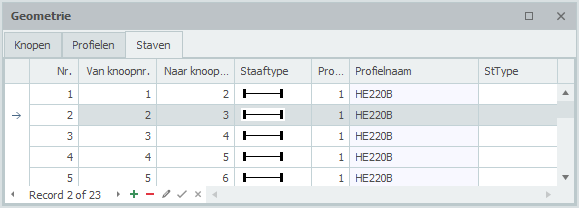
Tabel Staven
Staven kunnen ook in de tabel Staven linksonder worden toegevoegd en/of gewijzigd. Het maakt niet uit. Ook kunt u tussentijds wisselen tussen grafische invoer en tabellarische invoer.
XFrame2d 2.01