Staafbelastingen


Staafbelastingen worden in een lokaal Staaf-assenstelsel opgegeven. Zie Tekenafspraak.
Het onderstaande dialoogvenster wordt geopend.
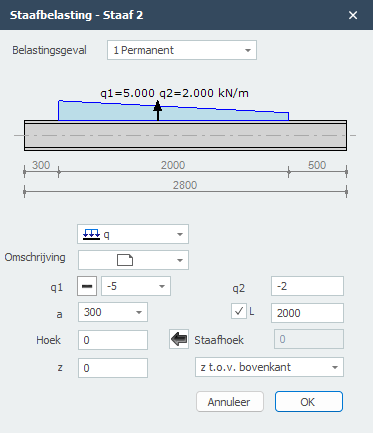
Belastingsgeval
Keuze van het belastingsgeval. Hier kunt u ook direct een nieuw belastingsgeval aanmaken.
Type belasting
Kies het type belasting dat u wilt toevoegen.
type
omschrijving

gelijkmatig verdeelde belasting of verlopende belasting
puntlast - F-belasting
moment - M-belasting
q1
De grootte van de belasting. Voor q-belasting de grootte van de belasting aan het begin in kN/m. Voor een puntlast de grootte van de belasting in kN, Voor een moment de grootte van de belasting in kNm.
Met 
 kunt u het teken van de belasting eenvoudig veranderen. Standaard staat het teken op . Dat is het meest voorkomend.
q2
Alleen voor q-belasting de grootte van de belasting aan het eind kN/m.
a
De afstand in mm waar de belasting begint, gerekend vanaf de beginknoop van de staaf.
L
Alleen voor q-belasting de lengte van de belasting. Standaard loopt de belasting tot aan het einde van de staaf.
hoek
Alleen voor de q- en F-belasting. De hoek in graden met de normaal. Tegengesteld aan de klokrichting is positief.
Staafhoek
De hoek in graden met de globale x-as. Tegengesteld aan de klokrichting is positief. Met  kunt u de hoek van de vorige staaf overnemen.
z
De afstand in z-richting in mm t.o.v. de referentielijn. De referentielijn is instelbaar: 'z- t.o.v. bovenkant' / 'z- t.o.v. zwaartelijn' / 'z- t.o.v. onderkant'.
Deze afstand is alleen relevant voor de toetsing van de kipstabiliteit.
Tabel
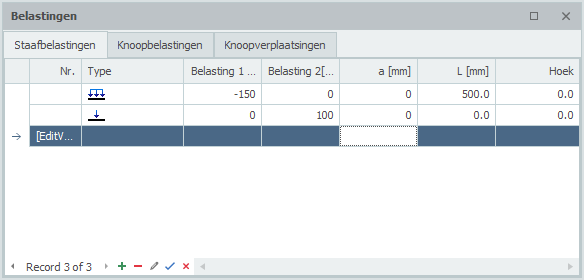
Staafbelastingen kunnen ook in de tabel worden toegevoegd en/of gewijzigd. Het maakt niet uit. U kunt ook tussentijds wisselen tussen grafische invoer en tabellarische invoer.
XFrame2d 2.01