Spion

Met behulp van de spion kunt u de resultaten van een bepaalde staaf in meer detail bekijken.
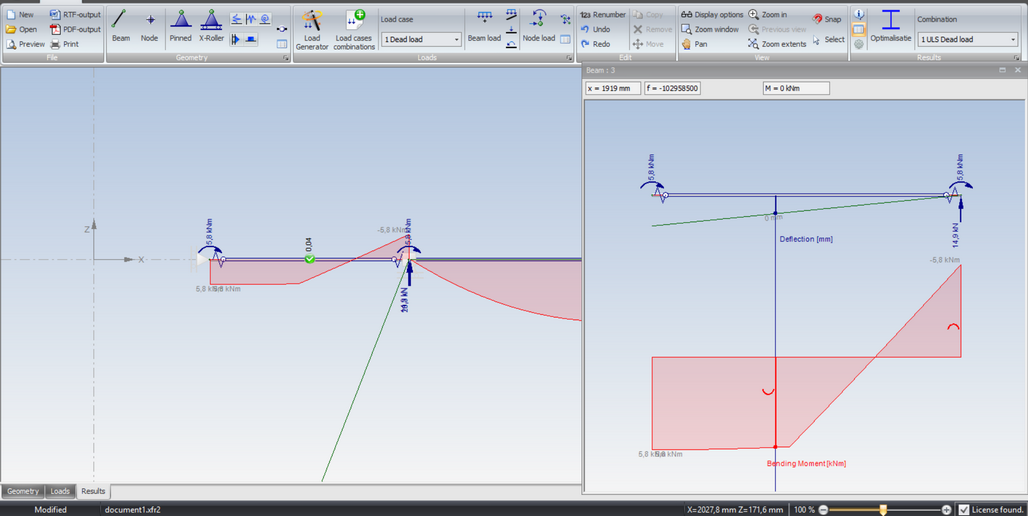
Druk op de knop . Het scherm wordt nu in twee schermen gesplitst. In het linkerscherm wordt de totale constructie getoond, of een ingezoomd deel van de constructie. In het rechterscherm wordt de geselecteerde staaf getoond. Door de verticale splitter te verplaatsen, kan de grootte van beide schermen worden aangepast.
In het linkerscherm klikt u op een van de staven. Deze staaf wordt in het rechterscherm getekend, inclusief de staafkrachten. In het rechterscherm kunt u de verticale lijn verplaatsen. De krachten worden bovenaan het rechterscherm getoond.
U hebt de keuze uit N-lijnen, D-lijnen, M-lijnen en/of doorbuigingslijnen.
Door nogmaals op de knop te drukken, gaat u terug naar slechts één scherm.
XFrame2d