Joints
Joints can be entered at nodes.
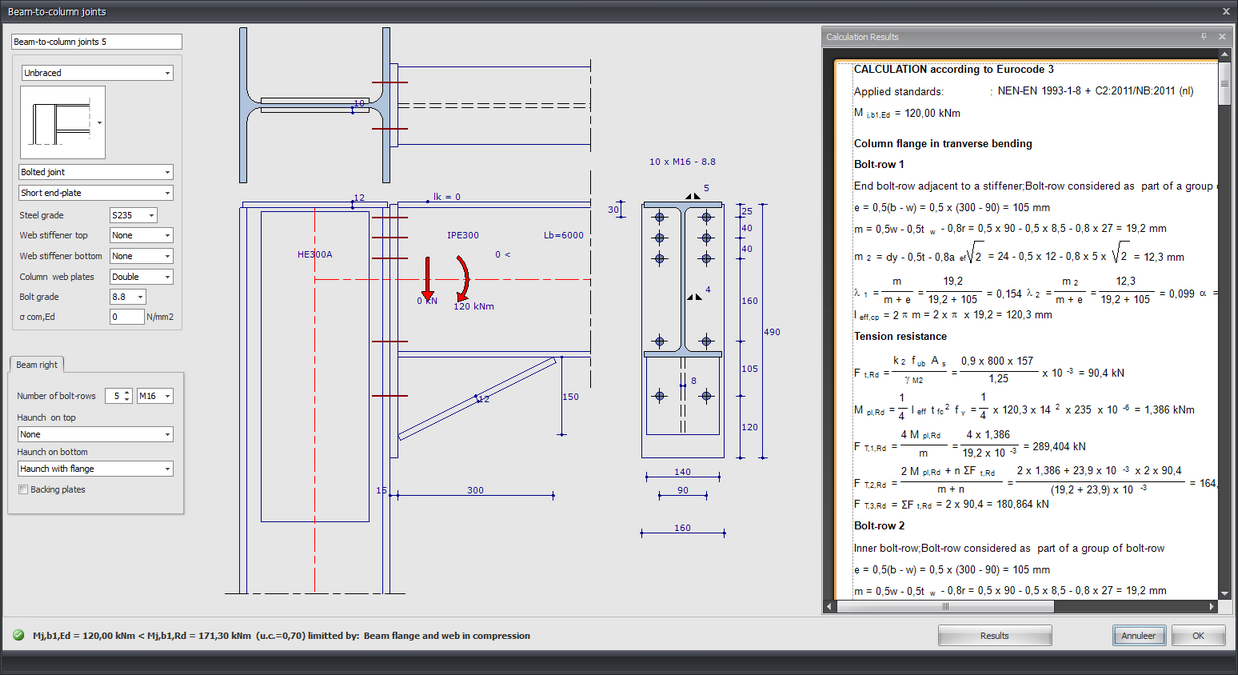
Input in drawing
In the drawing of the connection you can change almost anything. You can change all sizes by clicking on the number in the dimension line. See Changing dimensions.
You can also change the profiles, beam angles and loads in the drawing. This not only works quickly but is also intuitive. You will experience how easy and how pleasant it is to work with Xframe2d. The calculation results can be displayed on the right as "docked" or as a separate screen on a 2nd monitor. With every change, the calculation is carried out and the results are immediately visible. That way you can see the effect of your change. You can see all in one view. Both the input and the calculation output.
Lb=4000
Length of the beam (This value can be changed in the drawing.)
This is only important for the classification of the rotational rigidity of the connection. (rigid / semi-rigid / hinged)
0 <
Angle of the beam.
You set a number of parameters in the dialog box below.
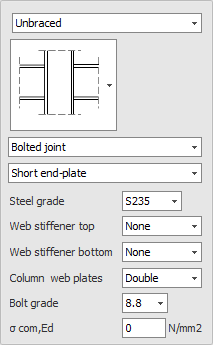
Classificatie constructie : Braced / Unbraced
This is only important for the classification of the rotational rigidity of the connection. (rigid / semi-rigid / hinged)
Type connection : Bolted joint / Welded joint
Type end plate : Short end-plate / Extended en-plate
Steel gradeWeb stiffener top : None / Full / Partial
Web stiffener bottom : None / Full / Partial
Column web plates : None / Single / Double
Bolt gradeSigma;com,Ed
The largest axial compression stress in the column. This is calculated automatically and does not need to be entered.
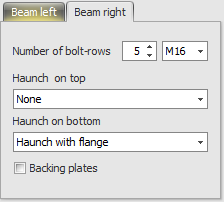
Beams symmetrical
With a double connection (left and right) you can set whether both are equal (symmetrical) or not. This means that when you change one side and the other side changes automatically
Number of bot-rows
The number of bolt rows is at least 2.
BoltHaunch on top : None / Haunch without flange / Haunch with flange
Haunch on bottom : None / Haunch without flange / Haunch with flange
Backing plates
Setting or backing plates are used.
XFrame2d